Building a Quick Capture Tool for Obsidian on Linux
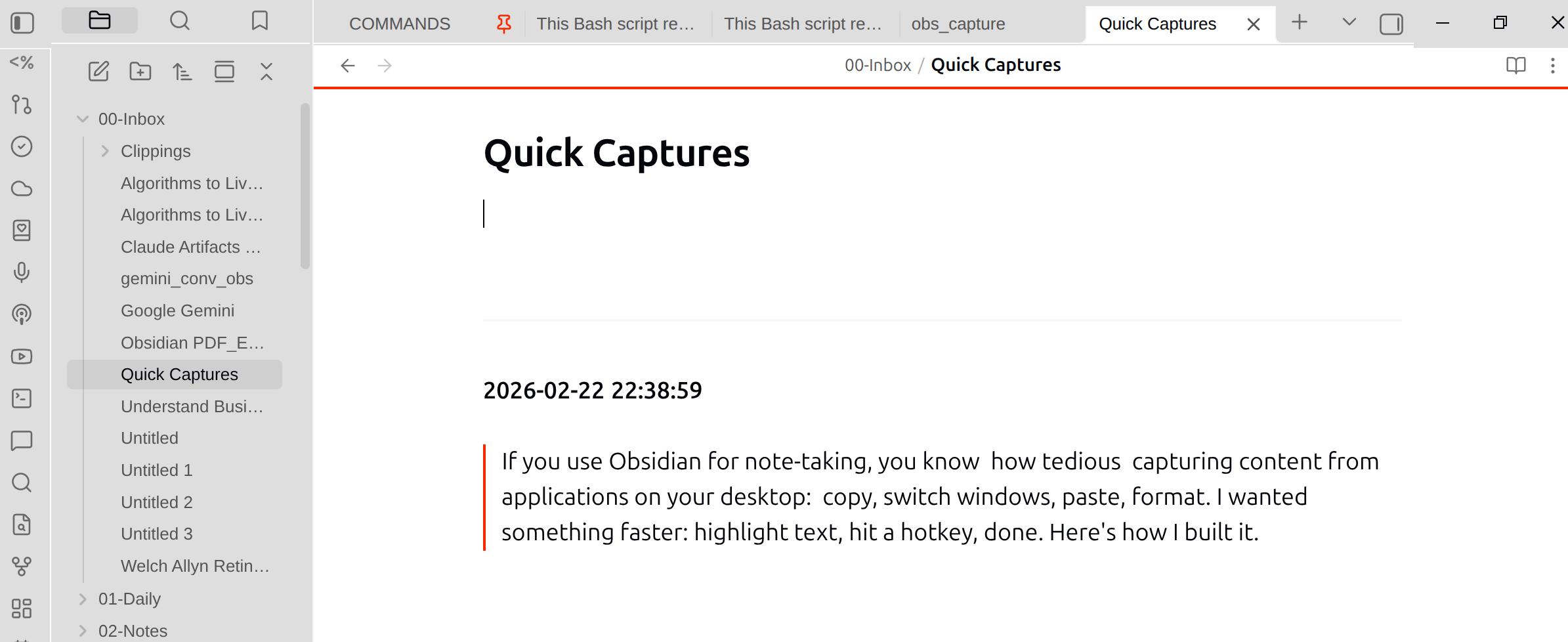
If you use Obsidian for note-taking, you know how tedious capturing content from applications on your desktop: copy, switch windows, paste, format. I wanted something faster: highlight text, hit a hotkey, done. Here's how I built it.
The Goal
A simple capture system that:
Grabs any highlighted text instantly
Optionally includes screenshots
Works with Obsidian's Local REST API
Integrates with Linux desktop shortcuts
The Solution
A Python script that leverages the Local REST API plugin for Obsidian. The plugin exposes a REST API that lets you read, create, and modify notes programmatically.
How It Works
Text Selection: Uses
xclip(X11) orwl-paste(Wayland) to read the primary selection—text you've highlighted but haven't copiedScreenshots: Integrates with Flameshot (X11) or grim/slurp (Wayland) for area selection
REST API: Uploads images and appends content to your vault via HTTP
Notifications: Desktop feedback via
notify-send
The Script
#!/usr/bin/env python3
"""
Obsidian Quick Capture Script

Captures highlighted text (and optionally screenshots) to an Obsidian note
via the Local REST API plugin.

Usage:
    obs_capture.py           # Capture selected text only
    obs_capture.py -s        # Capture text + screenshot
    obs_capture.py -n Note   # Use custom target note
"""

import argparse
import subprocess
import requests
import datetime
import os
import sys
import urllib3

# Suppress insecure HTTPS request warnings (expected for Local REST API self-signed certs)
urllib3.disable_warnings(urllib3.exceptions.InsecureRequestWarning)

# --- Configuration ---
API_KEY = "YOUR_API_KEY_HERE"  # Get from Obsidian Local REST API plugin settings
BASE_URL = "https://127.0.0.1:27124"

# Default paths (relative to vault root)
DEFAULT_NOTE = "00-Inbox/Quick Captures.md"
ATTACHMENT_DIR = "Attachments/"

HEADERS = {
    "Authorization": f"Bearer {API_KEY}"
}


def notify(title: str, message: str, urgency: str = "normal"):
    """Send a desktop notification using notify-send."""
    try:
        subprocess.run(
            ["notify-send", "-u", urgency, title, message],
            check=False
        )
    except FileNotFoundError:
        print(f"[{urgency.upper()}] {title}: {message}")


def get_selected_text() -> str:
    """Grab currently highlighted text from primary selection (X11 or Wayland)."""
    # Try xclip first (X11 primary selection)
    try:
        result = subprocess.run(
            ["xclip", "-o", "-selection", "primary"],
            capture_output=True,
            text=True,
            check=True
        )
        return result.stdout.strip()
    except (subprocess.CalledProcessError, FileNotFoundError):
        pass

    # Fallback to wl-paste (Wayland)
    try:
        result = subprocess.run(
            ["wl-paste", "-p"],
            capture_output=True,
            text=True,
            check=True
        )
        return result.stdout.strip()
    except (subprocess.CalledProcessError, FileNotFoundError):
        pass

    return ""


def take_screenshot(filepath: str) -> bool:
    """Allow user to draw a rectangle and capture it (X11 with Flameshot or Wayland with grim/slurp)."""
    # Try Flameshot first (X11)
    try:
        subprocess.run(
            ["flameshot", "gui", "-p", filepath],
            check=True,
            capture_output=True
        )
        if os.path.exists(filepath):
            return True
    except (subprocess.CalledProcessError, FileNotFoundError):
        pass

    # Fallback to grim/slurp (Wayland)
    try:
        subprocess.run(
            f'grim -g "$(slurp)" "{filepath}"',
            shell=True,
            check=True
        )
        return os.path.exists(filepath)
    except subprocess.CalledProcessError:
        return False

    return False


def check_api_connection() -> bool:
    """Verify the Obsidian Local REST API is reachable."""
    try:
        response = requests.get(
            f"{BASE_URL}/",
            headers=HEADERS,
            verify=False,
            timeout=5
        )
        return response.status_code in (200, 404)
    except requests.exceptions.RequestException:
        return False


def ensure_note_exists(note_path: str) -> bool:
    """Create the target note if it doesn't exist."""
    url = f"{BASE_URL}/vault/{note_path}"
    try:
        response = requests.get(url, headers=HEADERS, verify=False)
        if response.status_code == 200:
            return True

        if response.status_code == 404:
            create_response = requests.put(
                url,
                headers={**HEADERS, "Content-Type": "text/markdown"},
                data="# Quick Captures\n".encode("utf-8"),
                verify=False
            )
            return create_response.status_code in (200, 201, 204)
        return False
    except requests.exceptions.RequestException:
        return False


def upload_image(img_path: str, dest_filename: str) -> bool:
    """Upload an image to the Obsidian vault."""
    url = f"{BASE_URL}/vault/{ATTACHMENT_DIR}{dest_filename}"

    try:
        with open(img_path, "rb") as f:
            img_data = f.read()

        response = requests.put(
            url,
            headers={**HEADERS, "Content-Type": "image/png"},
            data=img_data,
            verify=False
        )
        return response.status_code in (200, 201, 204)
    except requests.exceptions.RequestException:
        return False


def append_to_note(note_path: str, content: str) -> bool:
    """Append content to a note in the vault."""
    url = f"{BASE_URL}/vault/{note_path}"

    try:
        response = requests.post(
            url,
            headers={**HEADERS, "Content-Type": "text/markdown"},
            data=content.encode("utf-8"),
            verify=False
        )
        return response.status_code in (200, 201, 204)
    except requests.exceptions.RequestException:
        return False


def parse_args() -> argparse.Namespace:
    """Parse command-line arguments."""
    parser = argparse.ArgumentParser(
        description="Capture highlighted text (and optionally screenshots) to Obsidian.",
        formatter_class=argparse.RawDescriptionHelpFormatter,
        epilog="""
Examples:
  %(prog)s              Capture selected text only
  %(prog)s -s           Capture text + screenshot
  %(prog)s -n Inbox.md  Use custom target note
"""
    )
    parser.add_argument(
        "-s", "--screenshot",
        action="store_true",
        help="Also capture a screenshot (text is always captured)"
    )
    parser.add_argument(
        "-n", "--note",
        default=DEFAULT_NOTE,
        help=f"Target note path (default: {DEFAULT_NOTE})"
    )
    return parser.parse_args()


def main():
    args = parse_args()
    timestamp = datetime.datetime.now().strftime("%Y-%m-%d %H:%M:%S")

    # 1. Check API connection
    if not check_api_connection():
        notify(
            "Obsidian Capture Failed",
            "Cannot connect to Obsidian Local REST API.\nMake sure Obsidian is running with the plugin enabled.",
            "critical"
        )
        sys.exit(1)

    # 2. Get selected text
    text = get_selected_text()
    if not text:
        notify(
            "Obsidian Capture Failed",
            "No text selected. Highlight some text first.",
            "critical"
        )
        sys.exit(1)

    # 3. Ensure target note exists
    if not ensure_note_exists(args.note):
        notify(
            "Obsidian Capture Failed",
            f"Could not create or access note: {args.note}",
            "critical"
        )
        sys.exit(1)

    # 4. Build content to append
    content_to_append = f"\n\n---\n\n**{timestamp}**\n\n"
    content_to_append += f"> {text}\n"

    # 5. Handle screenshot if requested
    img_filename = None
    if args.screenshot:
        img_filename = f"capture_{datetime.datetime.now().strftime('%Y%m%d_%H%M%S')}.png"
        img_filepath = f"/tmp/{img_filename}"

        if take_screenshot(img_filepath):
            if upload_image(img_filepath, img_filename):
                content_to_append += f"\n![[{img_filename}]]\n"
            else:
                notify("Warning", "Screenshot taken but failed to upload to Obsidian.")
            if os.path.exists(img_filepath):
                os.remove(img_filepath)
        else:
            notify("Warning", "Screenshot cancelled or failed. Text will still be captured.")

    # 6. Append to note
    if append_to_note(args.note, content_to_append):
        preview = text[:50] + "..." if len(text) > 50 else text
        msg = f'Captured: "{preview}"'
        if img_filename:
            msg += " + screenshot"
        notify("Obsidian Capture", msg)
    else:
        notify("Obsidian Capture Failed", "Failed to append content to note.", "critical")
        sys.exit(1)


if __name__ == "__main__":
    main()
Setting Up Keyboard Shortcuts
On GNOME, register global hotkeys via gsettings:
# Text capture: Super+Shift+C
gsettings set org.gnome.settings-daemon.plugins.media-keys.custom-keybinding:/org/gnome/settings-daemon/plugins/media-keys/custom-keybindings/custom0/ name 'Obsidian Capture Text'
gsettings set org.gnome.settings-daemon.plugins.media-keys.custom-keybinding:/org/gnome/settings-daemon/plugins/media-keys/custom-keybindings/custom0/ command '/home/you/.local/bin/obs_capture.py'
gsettings set org.gnome.settings-daemon.plugins.media-keys.custom-keybinding:/org/gnome/settings-daemon/plugins/media-keys/custom-keybindings/custom0/ binding '<Super><Shift>c'

# Text + screenshot: Super+Shift+S
gsettings set org.gnome.settings-daemon.plugins.media-keys.custom-keybinding:/org/gnome/settings-daemon/plugins/media-keys/custom-keybindings/custom1/ name 'Obsidian Capture Screenshot'
gsettings set org.gnome.settings-daemon.plugins.media-keys.custom-keybinding:/org/gnome/settings-daemon/plugins/media-keys/custom-keybindings/custom1/ command '/home/you/.local/bin/obs_capture.py -s'
gsettings set org.gnome.settings-daemon.plugins.media-keys.custom-keybinding:/org/gnome/settings-daemon/plugins/media-keys/custom-keybindings/custom1/ binding '<Super><Shift>s'

# Register them
gsettings set org.gnome.settings-daemon.plugins.media-keys custom-keybindings "['/org/gnome/settings-daemon/plugins/media-keys/custom-keybindings/custom0/', '/org/gnome/settings-daemon/plugins/media-keys/custom-keybindings/custom1/']"
The Result
Highlight any text, press Super+Shift+C, and it appears in your vault:
---

**2026-02-22 21:34:19**

> Your captured text here
With -s flag or Super+Shift+S, you get text plus an embedded screenshot.
Requirements
Obsidian with Local REST API plugin enabled
Python 3 +
requestslibraryX11:
xclip,flameshot,libnotify-binWayland:
wl-clipboard,grim,slurp
# Ubuntu/Debian (X11)
sudo apt install xclip flameshot libnotify-bin
pip install requests
Why This Matters
The best capture system is the one you actually use. By reducing friction to a single hotkey, I find myself capturing more—interesting quotes, code snippets, error messages—without breaking my workflow. Everything flows into a single inbox note that I process later.
The full documentation is available at ~/.local/share/doc/obs_capture.md.
Happy capturing!

