LifeLogr - A Rich Multimedia Journal App
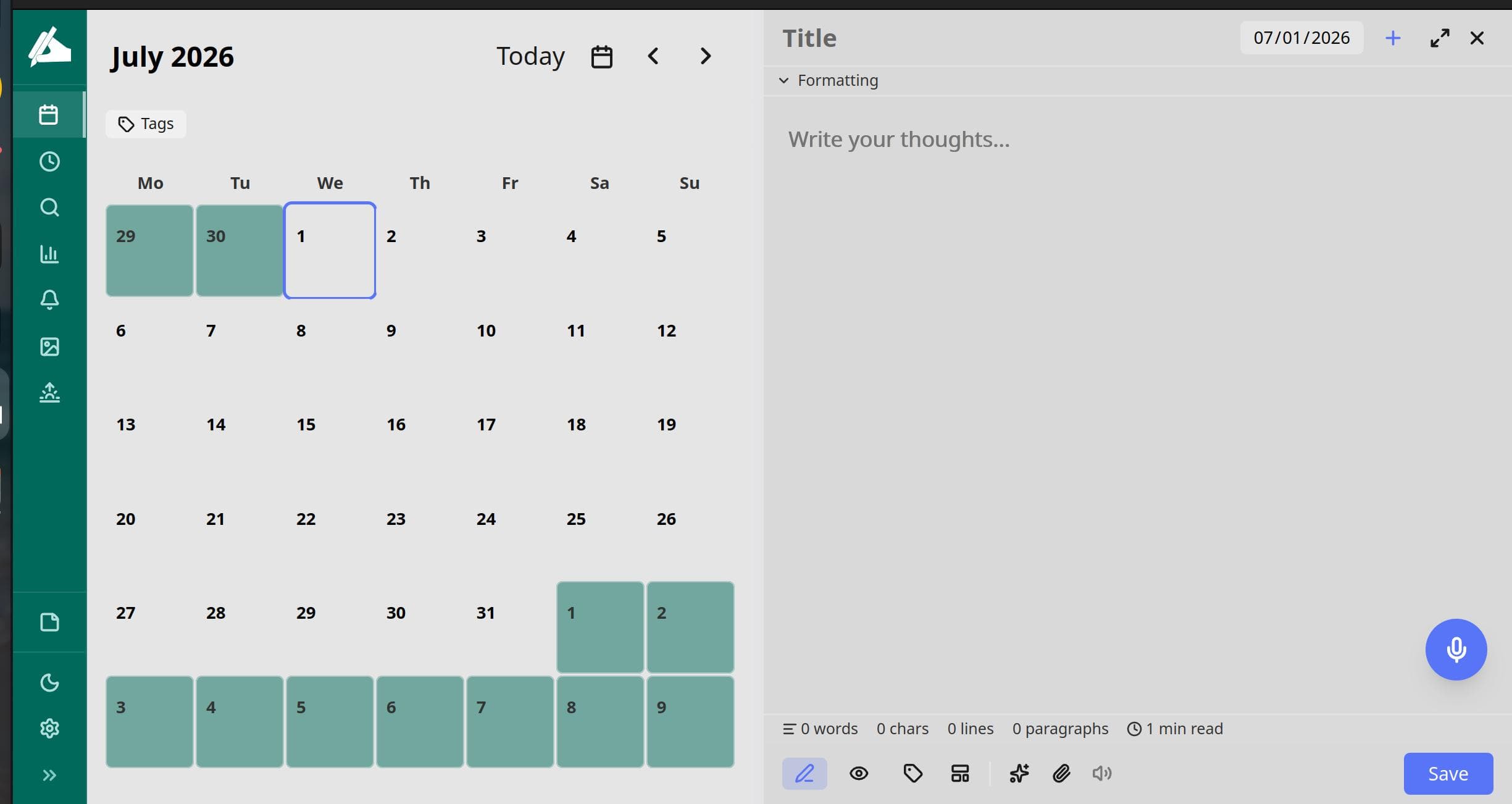
After trying many journaling apps, I settled on Diarium for its rich, calendar-driven features like photo, audio, and mood attachments. However, I was frustrated when I switched to Linux and found it wasn't supported, forcing me to reboot into Windows just to write my entries. That led me to build LifeLogr, which includes Diarium and other features.
LifeLogr is a privacy-focused, offline-first journaling app for Linux (Ubuntu 24.x LTS). It offers a Diarium-like experience while keeping you in full control of your data. This post explores LifeLogr’s features and architecture.

Features at a Glance
Date-bound journaling — multiple entries per calendar day, soft-deleted (never hard-destroyed), with full markdown bodies.
Rich media — inline images, video notes, and document attachments, all managed by a media service that cleans up files on soft delete.
Voice notes — record, to the entry body.
AI tools — a registry-driven AI system powering grammar checks, mood insights, and reflection prompts, all via a local Ollama instance.
Hybrid search — SQLite FTS5 for keyword search plus semantic vector search (embeddings) for "find me entries that feel like this."
Reminders & prompts — APScheduler-driven cron jobs with offline catch-up, so reminders fire even if your laptop was asleep.
Encrypted cloud sync — incremental, end-to-end encrypted backups to Google Drive, OneDrive, or Dropbox, with atomic restore.
Templates — reusable entry templates for daily standups, gratitude logs, trip logs, and more.
Analytics — mood trends, writing streaks, and tag distributions rendered in accessible Vue dashboards.
Architecture
LifeLogr is a layered, multi-platform application:
┌─────────────────────────────────────────────────┐
│ Desktop Shell (Tauri v2 / Rust) │
│ ┌────────────────────┐ ┌────────────────────┐ │
│ │ Vue 3 SPA │ │ Python sidecar │ │
│ │ Vite + TS + Pinia │ │ FastAPI backend │ │
│ │ TailwindCSS v4 │◄─┤ SQLAlchemy + SQLite│ │
│ └────────────────────┘ └────────────────────┘ │
└─────────────────────────────────────────────────┘
Backend (backend/)
FastAPI async server with Pydantic v2 schemas.
SQLAlchemy 2.x over SQLite in WAL mode with foreign keys enforced. Schema migrations are inline and idempotent — no Alembic, no drift.
Layered routers → services → models, with one service per bounded context (Journal, Tagging, Media, Voice, Backup, Analytics, Sync, Reminders, Search).
Local ML integrations: Ollama for embeddings and AI tools, Tesseract for OCR on attached images.
Frontend (frontend/)
Vue 3 single-page app built with Vite, TypeScript, Pinia, and TailwindCSS v4.
A registry-driven AI tool system — the drawer, context menu, and composable all iterate one config, so adding a tool is a one-liner.
Accessible (WCAG-minded) dashboard, timeline, map, and calendar views.
Desktop wrapper (desktop/)
Tauri v2 Rust app that bundles the Vue frontend and ships the Python backend as a packaged sidecar, producing a native
.deband AppImage.The frontend build injects
VITE_APP_VERSIONfromCargo.toml, so the About tab and the bundle filename always agree.
Mobile (mobile/)
- Capacitor scaffolding for a future iOS/Android port.
Why This Matters
Offline-first — the app is fully usable with no network. Sync is an opt-in side-channel.
Local AI — transcription and language assistance run on your hardware, not a third-party API.
Encrypted backups — your journal is recoverable without ever being readable by your cloud provider.
Open architecture — a plugin system, FTS5 + semantic search, and a clean SDD-documented codebase (150 passing tests) make it straightforward to extend.
If you've been holding out for "Diarium, but on Linux, and open, and private" — LifeLogr is for you.

Want to try it? Clone the repo, make setup, then make run. The full spec-driven design docs live under docs/ if you'd like to read the architecture in depth.
Git Repo URL: https://github.com/emeeran/LifeLogr.git